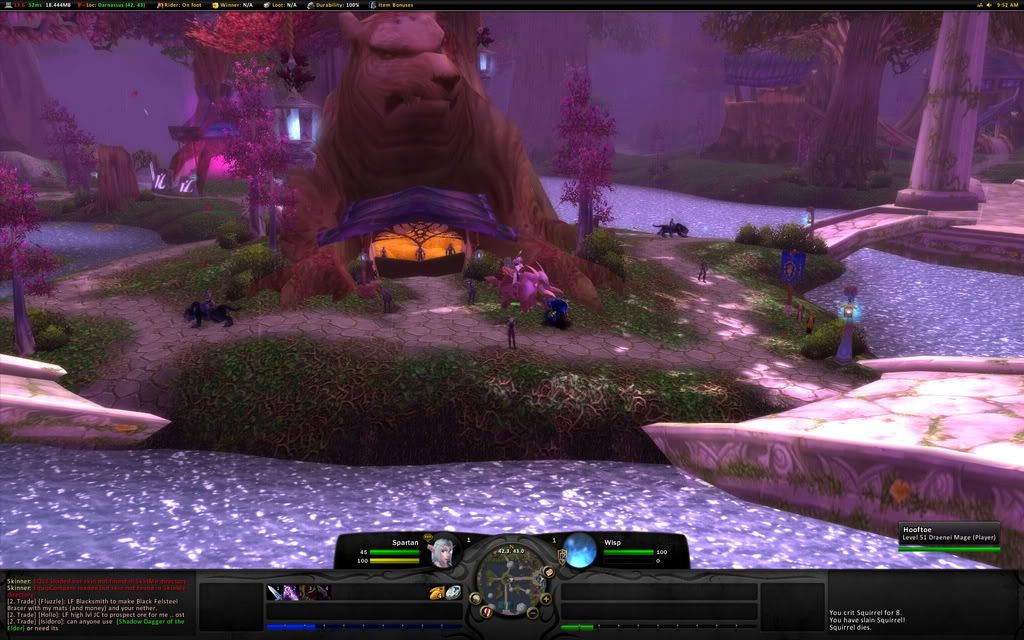
This is the first request I have recieved to review a users UI, and I am pretty excited to do it. After reviewing some of Clok's screenshots, this looks like it could be a "No Bullshit UI", and by that I mean, the only things he has in the UI, are the things he needs. Clok also took the time to make a install movie just like SpartanUI which I had reviewed earlier. One of the main focus points on this UI seems to be optimization, with a 5.9mb RAR file, and a 20mb Full load with 0-7kb/s average, you can see Clok has taken some extra steps to cut down on the resources this UI uses. The UI is downloaded, my UI is backed up, and I have the install video ready to go, so lets get on with the review.
The Installation (4/5)
 Ok, well not a very good start, I clicked play on the install video, and I get: "Could not download video file." Well, alright, it looks like we have to do it the old fashioned way. In the .rar are 3 folders, Fonts, Interface and WTF, after installing KerpUI a few weeks back, I know exactly what I need to do with these folders, so I go ahead and put all the AddOns into the Interface folder, and all of his Fonts into my WoW Fonts folder, as well as set up the WTF Account folder, by renaming all of his folders to my Account, Server and Character names. After that is all done, it is time for the first load of the UI, lets see how I did. First off, unlike SpartanUI, all of my personal Interface and Video settings were reset, to match Clok's game, such as my textures are at the worst setting. Other then that, the UI looks exactly the same as Clok's screen shots, so great job here.
Cleanliness (4/5)
 When you first look at the UI, you can tell, this is an extremely clean interface, I've said it before in other reviews, everything has a place, but this takes it one step further. Everything that is on the screen, can be used at some point while playing the game, there are no extra buttons to push or anything on the screen that is just eating up space and resources. Clok also took heed to those players still leveling their characters, as right above your health bar, you can see your experience, as well as an experience mod on the FuBar, placed right below the chatbox, as well as a mod that puts all your quests in the upper left hand corner for easy reference. All of the unitframe colors has the target as red, which can sometimes get confusing, especially when playing in a party or raid, or when targeting players of the opposing faction.
Ease of Use (3/5)
Apparently continunig with the trend of reviewing extremely small UI's I have found another. The action bar buttons, are no larger than 25 pixels in height, and crammed down into the bottom left corner, with only 23 buttons to place spells on. When I first went to attack a mob, I realized that I was in battle stance and did not have my charge spell on the bar, and after changing stances a few more times, I realized that the action bar does not have paging, therefore it would take some extra work to turn that on, and configure it. While configuring that, one may want to make the action bars a bit bigger, and possible add some more buttons. The chatbox was nice though, breaking each different category into its own different section, such as General, Guild/Party, Whispers and Reputation. The relocated tool tip may throw a few players off as well, but that is easily fixed, and can be customized to ones liking.
Resource Usage (4/5)
 Even having so many mods, 176 including the blizzard add ons to be exact, this UI still runs extremely well, my total addon memory was around 16.2 MiB, and the current memory being used was at 24.2 MiB. Just a few mb over what was advertised, I would call this UI a win in the resource section. I was also running around with about 60 fps constant in Shadowprey Village, and my normal 30 fps constant in major cities such as Orgrimmar, so no real change to my FPS.
Summary (15/20)
Even though this is Clok's first release, and there are plently of things that can be improved upon, if you are looking to go minimalistic, I would offer this UI to you, everything is really small and no space is wasted, which is the main focal point of a minimalistic UI. Some people may want to change some of the UI, such as the unit frame health bar colors, and also make the action buttons a bit larger, as well as add some more buttons down there, but all in all, this is a quality UI, and can be perfect for a special niche of players.
Download ClokUI HERE.